Artificial Intelligence, Programming
How to Add Bots to Discord Server on Mobile
How to Add Bots to Discord Server on Mobile “Discord” – a pro platform for streaming and chats service to get in touch with your community of like-minded gamers. It…
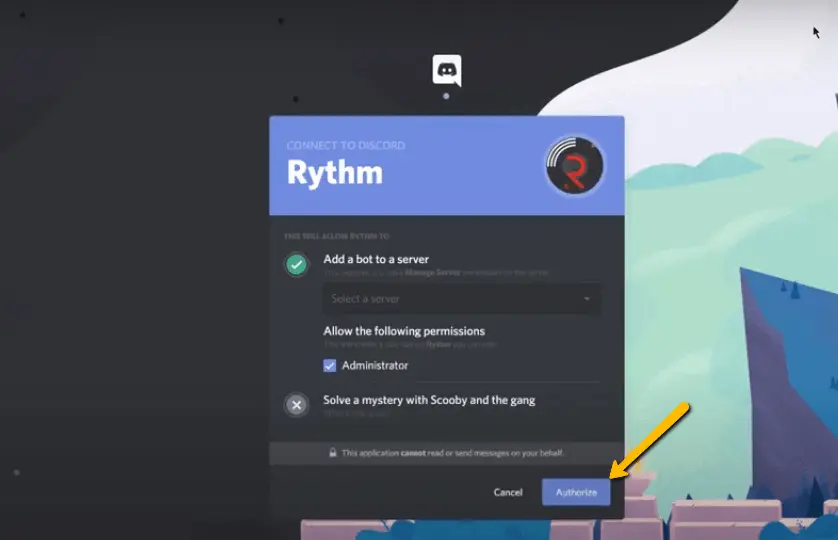
In its most basic version, Rythm is a music bot that filters a song queue when a playlist is created. By assuring usability, stability and offering music functions for the most outstanding music bot experience, it seeks to be the best at delivering high-performance and high-quality music.
Now you can enjoy your favorite songs with your best friends just because of rythm. To do this you just have to add rythm to Discord and start enjoying! You won’t believe but over 16m servers are using Rythm – an amazing and giant bot on Discord.
Advantages: Adding a Rhythm bot to Discord can enhance the user experience by providing a fun and interactive way to listen to music.
The current best music bot is Rythm. So if you are trying to bring music back to your discord, don’t worry. You are at the right place. Here’s how to add rythm bot to discord and get the current best music bot Rythm.
If you want to add the other Rythm bots, visit our releases on scrapewithbots.
When you are a discord user and enjoy listening music while chatting with friends or plying games, so music bots are available to make things smooth for you. Because with music bots you can fulfill any of your specific purpose. Discord music bots allow all the server members to enjoy and make a playlist with their favorite songs.
More specifically, the Rythm bot supports SoundCloud, Twitch, YouTube, and multiple musics streaming services to play on Discord.
Here’s how to add rythm bot to discord; follow the steps below. If you already have a Discord account, follow these simple steps to add, configure, and use Rythm Discord Bot in minutes.
If you want to add the Rythm bot to your Discord. Go to the official Rythm webpage and click on the “Invite Rythm to your Discord” button. Using any browser, visit the Rythm bot’s website, rythm.fm. You should have no problems with this as long as your internet connection is good.
Click on the “Invite the bot” button.
Choose the server you like to add the Rythm bot and click on the “Continue” button.
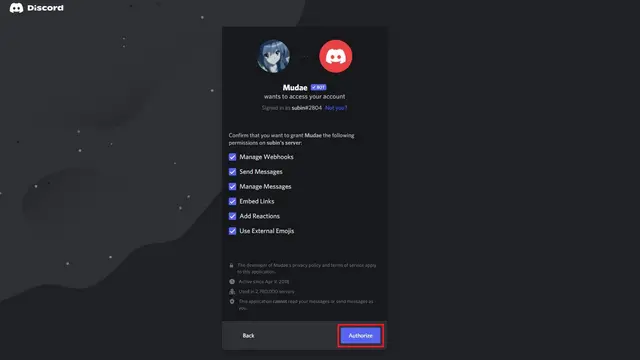
Use your credentials to log into your discord account. Authorize Rythm to access your discord account. All boxes, including the ‘Administrator’ box, should be checked. Your other settings will be invalid if you don’t do this.
Then you will get an option to add the Rythm bot to any discord server you like.
Once you have added to the server, go to the voice channel. The “Rythm” bot has been successfully added to our Discord server.
Let’s look at how to add rythm bot to discord on a mobile application.

Are you worrying that you may not enjoy rythm bot because you’re a mobile user? We’re here to solve your problem and will tell you how to add rythm bot to discord server on Mobile. Now, Discord mobile users can enjoy their favorite songs by adding Rythm bot to their accounts. These instructions will help you to add this amazing bot on your device.
Create a Voice Channel and name it whatever you want. I prefer Music, or you can go more specific like Jazz or Rock. It will be visible on the left pane below your server. Do not forget to invite your friends and then use the following commands to play music.
Now you can enjoy music with your discord community with the help of a famous music-playing bot “Rythm bot”. By assuring usability, stability and offering music functions for the most outstanding music bot experience.
Key Takeaways: To use the Rythm bot in Discord, first add the bot to your server, then type “!join” to have the bot join your voice channel, and use the “!play [song name]” command to play a song.
With Discord, you can play music in two different ways. You can play your favorite music using your mic or add a Discord music bot to your server. These music bots allow users to share music with all the members of the server at the same time. The songs can be from different sources, such as Spotify, YouTube, Soundcloud, and other sources.
If you love to listen to your favorite music while playing or chatting with friends, continue reading about how to add rythm bot to discord to learn more about how to use rythm bot in discord.
Everyone in the group may listen to the same music using the command “Play” followed by the song’s name or the YouTube URL to start playing it.
With a prefix! Before it, you may also use additional commands like skip, delete, loop, etc. Learn more about using Rythm in the Discord bot by looking at this set of controls. Check to see if someone attempts to spam Rythm commands on your channels. To achieve this, click the addition “+” symbol next to text channels to add a new music control text channel.
Click “Create Channel” and give the channel a memorable name relevant to music control. To force individuals to utilize the specific channel we have developed to manage the music, ensure the instructions are not operable on any other media. Right-click the channel name twice to block more channels and choose “Edit Channel.”
Select the Plus “+” symbol next to Roles/Members by clicking the Permissions option in the left sidebar.
From the list, choose the Rythm bot.
Turn off the “Read Messages” permission in the Rythm role permissions views to prevent Rythm from reading messages from the channel. It could make consumers quit using other media to control music.
Finally, to ensure that the channel we built is the only remaining, you must now repeat the process for all the text channels on your server.
Now that you have successfully added the music bot to the Discord server, you can use Rythm to listen to your favorite songs with friends. Refer to the steps provided on how to do it:

Now when you’ve learned about how to add rythm bot to discord, you must be wondering how to use Rythm bot? You may not know about the prefix of rythm bot, well it’s “!”. With it you’re free to use some directives like play, pause, resume, shuffle, queue, etc. To start playing the song, click on the command “!Play” and then type the name of the song or YouTube URL, and you can enjoy the same playlist with your friends.
You can similarly use other commands like skip, remove, loop, etc. For more, visit ScrapeWithBots.
To protect all your channels from people’s continuous spamming of Rythm commands that ultimately results in “spam”, you need a separate channel. For this you just have to click on the plus ” + ” sign beside text channels and you’ll have a separate music control text channel.
If you don’t have programming experience, don’t worry, Discord Bots are pretty simple to add and maintain. There are several bot providers available on the web. All you need to know is which one you’d like to use.
In this article, I’ll walk you through the process of adding a music bot to your Discord server.
The first step is finding a bot you’d like to experiment with. There are bot repository sites with hundreds or thousands of bots listed, along with descriptions and reviews from other users.
Launch Discord and join a voice channel. Type "!search" and enter the song or artist. The bot will list the results. Please enter the number of the song and add it to your playlist.
As you may have already heard, the most giant music bot on Discord, Rythm was shut down. It was unfortunate, but this happened because Google sent them a cease and desist letter to take down their services because they violated YouTube's Terms of Service.
Now you know how to add Rythm bot to discord. In short, open the browser, visit Rythm’s official website, and click “Invite Rythm to your Discord.” Then, choose the server you like to add the specified bot.
I hope this helped you in your trouble to add a bot to discord. To know more about bots and their addition to Discord, visit our blog and give yourself an informational treat.
Artificial Intelligence, Programming
How to Add Bots to Discord Server on Mobile “Discord” – a pro platform for streaming and chats service to get in touch with your community of like-minded gamers. It…
Artificial Intelligence, Programming, Project
How to Make a Discord Music Bot Python? In this blog, we’ll tell you how to make a discord bot. A Discord music bot allows multiple server members to listen…

Artificial Intelligence, Programming, Project
Which Describes Personal Automation? The term ‘Automation‘ refers to the technology applications that allow different processes to occur on their own by minimizing the human intervention. It offers business process…
If the store doesn't cover the website or the job, tell us about it. We build the scraper or bot, run it for you or hand it over as a desktop app, and support it afterwards.